Deployment
Nixiesearch is distributed as a single Docker container (with a special flavors for CPU and GPU inference) and can be deployed as a regular dockerized app:
- Standalone: simple single-node install with Docker, with search and index API colocated within a single process. Recommended for dev environments and installs with no need for fault tolerance.
- Distributed: distributed setup with separate indexer and searcher services, backed by S3-compatible block storage. Recommended for large and fault-tolerant installs.
Docker Images
Nixiesearch offers different Docker image variants to match your deployment requirements:
JDK-Based Images
Standard images built with OpenJDK, tagged as <version> (e.g., 0.8.0, latest):
- Architecture support: x86_64 and arm64
- Features: Full ONNX embedding inference and llamacpp LLM support
- Use cases: Production deployments with semantic search and RAG capabilities
- GPU variant: Available with
-gpusuffix (e.g.,latest-gpu) for CUDA acceleration
Native Images
GraalVM Native Image builds for faster startup, tagged as <version>-native (e.g., 0.8.0-native, latest-native):
- Architecture support: x86_64 only
- Features: Lexical search and API-based inference only (no ONNX or llamacpp)
- Use cases: Serverless deployments (Lambda), environments requiring fast cold starts
- Status: Highly experimental
Choose JDK-based images for production workloads with full feature support, or native images for serverless deployments where fast startup matters more than local inference capabilities.
Container Registries
Nixiesearch Docker images are available from two registries:
Docker Hub (Primary)
nixiesearch/nixiesearch:<tag>
Docker Hub is the default registry for most deployments. All image variants and tags are available:
nixiesearch/nixiesearch:latest- Latest JDK-based multi-arch image (Docker automatically pulls the correct variant for your platform)nixiesearch/nixiesearch:0.8.0- Specific version (multi-arch)nixiesearch/nixiesearch:0.8.0-amd64- Platform-specific x86_64 variantnixiesearch/nixiesearch:0.8.0-arm64- Platform-specific ARM64 variantnixiesearch/nixiesearch:latest-gpu- GPU-enabled variantnixiesearch/nixiesearch:latest-native- Native GraalVM imagenixiesearch/nixiesearch:0.8.0-native-amd64- Specific native version
Multi-arch tags (like 0.8.0 and latest) use Docker manifests to automatically pull the correct platform-specific image for your architecture.
AWS ECR Public Registry
public.ecr.aws/nixiesearch/nixiesearch:<tag>
AWS ECR Public Registry mirrors all Docker Hub images and is required for certain AWS services:
- AWS Lambda: Lambda deployments must use ECR images (see Lambda deployment guide)
- Same tags and variants as Docker Hub
- Lower latency when deploying to AWS infrastructure
Both registries are kept in sync and contain identical images. Choose Docker Hub for general use, or ECR when deploying to AWS Lambda or when you need optimized performance within AWS.
Standalone
In standalone mode searcher and indexer are colocated on a single Nixiesearch process:
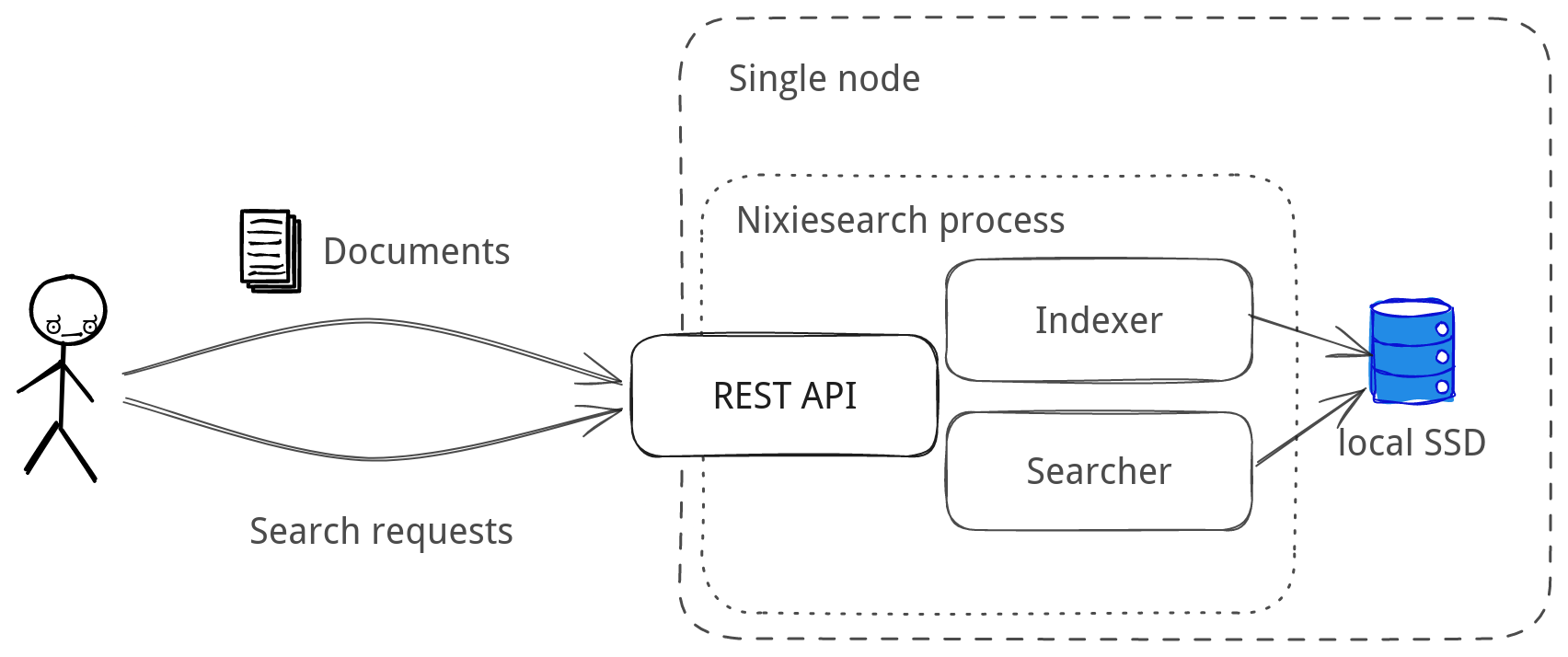
Standalone mode is easy to start as it enforces a set of simplifications for the setup:
- only REST API based document indexing is possible.
- S3-based index sync is not enabled.
To start nixiesearch in a standalone mode, use the nixiesearch standalone subcommand (where config.yml is an index mapping configuration file):
docker run -i -t -v <data dir>:/data/ -p 8080:8080 nixiesearch/nixiesearch:latest\
  standalone --config config.yml
Distributed
For production installs Nixiesearch can be rolled out in a distributed manner:
- separate searchers and indexer. Potentially searchers can be auto-scaled, and even scaled to zero.
- sync between indexer and searchers happens via S3-compatible block storage.
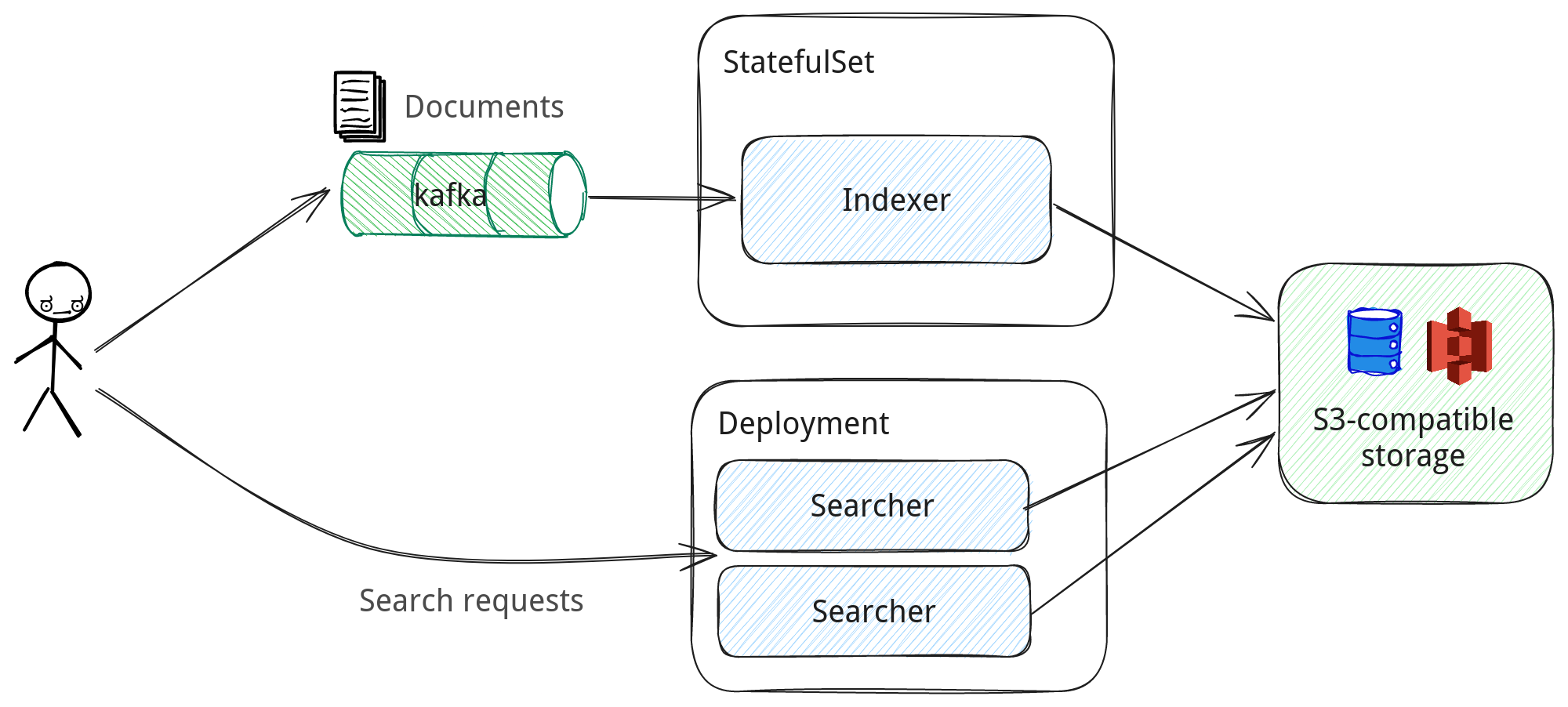
Nixiesearch has separate nixiesearch index and nixiesearch search sub-commands to run these sub-tasks.
Helm chart for smooth k8s deployment is planned for v0.3.